About the Security Center (Alpha)
This topic provides an overview of the Replicated Security Center.
The Security Center is Alpha. To get access to the Security Center, reach out to your Replicated account representative.
Overview
The Security Center helps you strengthen security enablement in your application delivery process by making it easier for both you and your enterprise customers to monitor security risks, assess known vulnerabilities, and view security information for each application release.
The Security Center is powered by Replicated’s SecureBuild technology. Every image is scanned continuously, not just at release time. Customers can see the same application version security information that you do, driving customer transparency, reduced security questionnaire burden, and adoption of newer, more secure versions of your application.
Requirements
-
Access to the Security Center Alpha requires a feature flag be turned on for your team. For more information, reach out to your Replicated account representative.
-
Display and reporting of application images requires the Replicated SDK version 1.8.0 or later.
-
Display and reporting of Embedded Cluster images requires the Replicated SDK version 1.9.0 or later.
-
For Helm CLI installations, to include all container images observed in the cluster in the Security Center reports (rather than application images only), set the Replicated SDK to Report All Images. This setting is automatically enabled for Embedded Cluster installations.
-
Each Helm chart in the release must have a unique HelmChart custom resource. The HelmChart custom resource is required to create the list of images that are scanned and reported on in the Security Center. This HelmChart custom resource requirement applies to both Helm CLI and Embedded Cluster installations.
The following is an example HelmChart custom resource for a chart named
examplechartwith a chart version of1.0.0:apiVersion: kots.io/v1beta2
kind: HelmChart
metadata:
name: examplechart
spec:
chart:
# name must match the name of the chart
name: examplechart
# chartVersion must match the version of the chart
chartVersion: 1.0.0For more information about the HelmChart custom resource, see HelmChart v2.
Limitations
- The Security Center is Alpha. The features and functionality of the Security Center are subject to change.
- Security Center reporting is available only for Embedded Cluster and Helm CLI installations. It is not available for kURL installations or for KOTS installations in an existing cluster.
- If you have configured the
builderkey in any of the HelmChart custom resources in your release, note that the Security Center uses the Helm values provided in thebuilderkey to create the list of images that are scanned and reported on for the given Helm chart. The Security Center will scan and report on this same list of images for both air gap and online installations. If there are any images that you want reported on in the Security Center, ensure that they are exposed by the values provided in thebuilderkey.
Security Center Interfaces
The Security Center is accessible through the following interfaces:
- Vendor-facing dashboard available in the Replicated Vendor Portal. See Vendor Portal below.
- Enterprise customer-facing dashboard available in the Replicated Enterprise Portal (optionally enabled per customer license). See Enterprise Portal below.
Vendor Portal
The Vendor Portal Security Center gives you access to the following key security insights for your releases:
- Known vulnerabilities in container images
- CVE details
- A summary of top security risks based on the assessed severity of the vulnerability
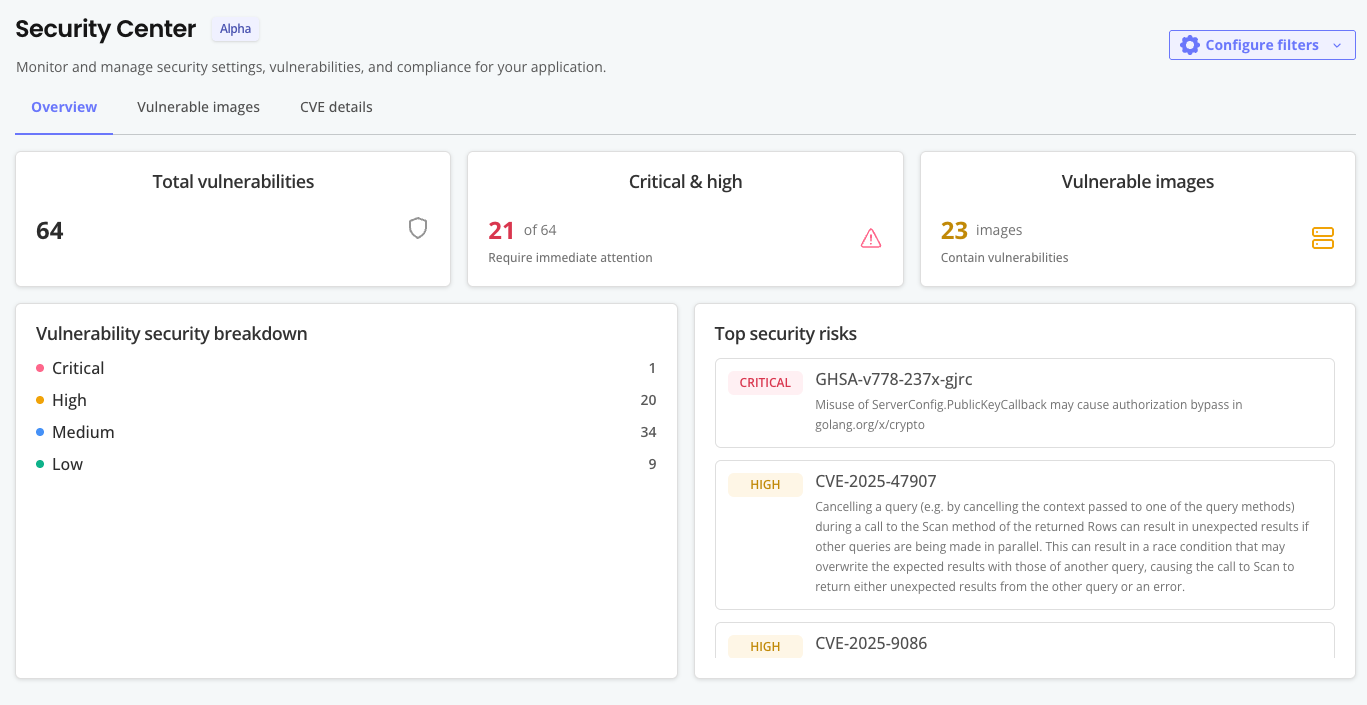
The following shows an example of the vendor-facing Security Center dashboard in the Vendor Portal:
View a larger version of this image
This dashboard displays an overview of vulnerabilities present in the release for the selected channel and installation type. When a channel is selected, the information displayed is for the promoted release for that channel.
Additionally, CVE details are available at the individual release level for all current and previously promoted application release versions. To view CVE information for a specifc release go to Releases > [Release Version] > Security.
You can also view CVE details at the individual customer level for active instances. To view CVE information for a specific customer instance go to Customers > [Customer] > [Instance] > Security. Instances must be running the Replicated SDK verson 1.8.0 or later.
Enterprise Portal
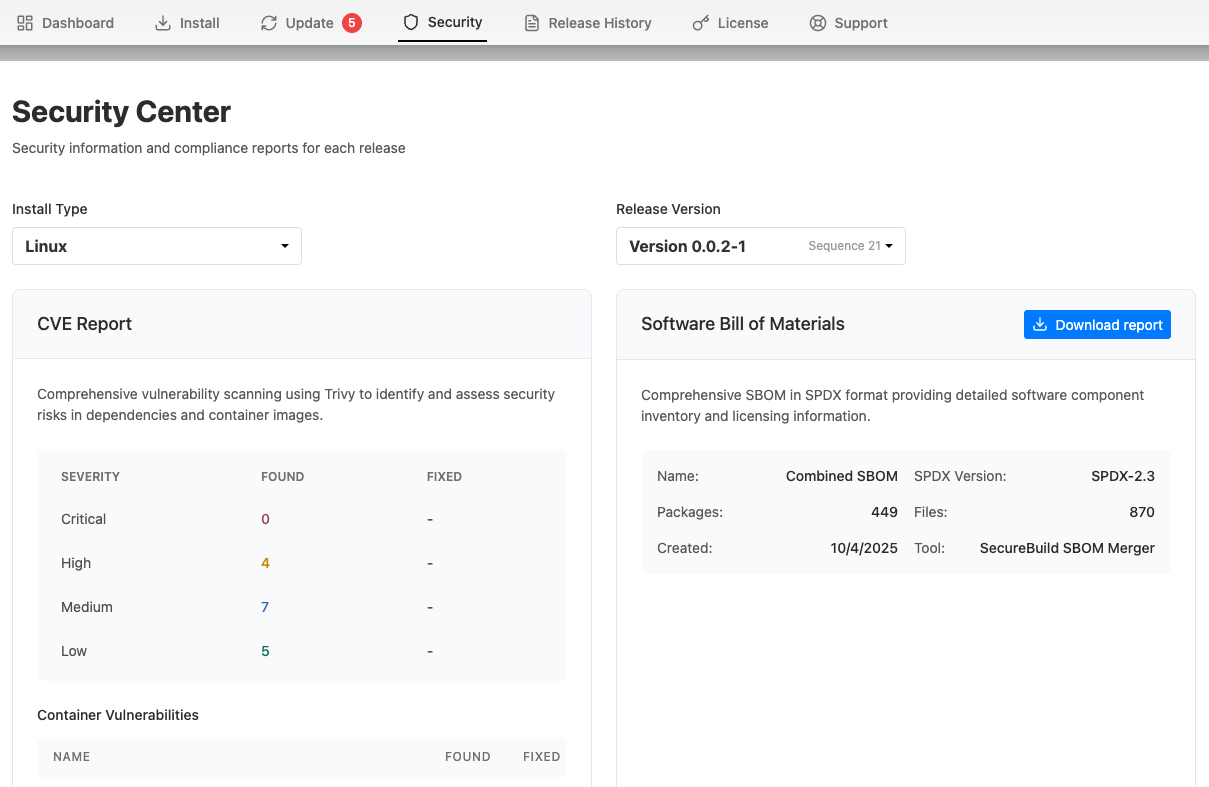
The Enterprise Portal Security Center allows you to provide key security information to your enterprise customers alongside your application releases.
On the Security Center tab of the Enterprise Portal, for each available release version, customers can:
- View a detailed report of known CVEs
- Download the Software Bill of Materials (SBOM)
The following shows an example of the Security Center dashboard in the Enterprise Portal:
View a larger version of this image
Enable the Enterprise Portal Security Center
The Security Center tab in the Enterprise Portal is not enabled by default. If the Security Center feature flag is enabled for your Vendor Portal team, you can optionally enable the Enterprise Portal Security Center tab on a per-customer basis or globally for all customers.
To enable the Security Center tab in a customer's Enterprise Portal, go to Customers > [Customer] > Enterprise Portal access.
To enable the Security Center tab for all customers using the Enterprise Portal, go to Enterprise Portal > Portal Settings > Optional Features and enable the Enable Security Center feature toggle.